Accessing the Peerbound Slackbot
Last updated: July 14, 2025
Find customer stories, reviews, and proof—directly in Slack
You can interact with the Slackbot in two ways:
1. In a Slack channel (with the @Peerbound app)
Add the Peerbound app to your Slack channel:
Type
@Peerboundand press Enter. Then select Add to Channel.
2. In a direct message to the Peerbound app
Click on Peerbound under Apps in the bottom-left of Slack.
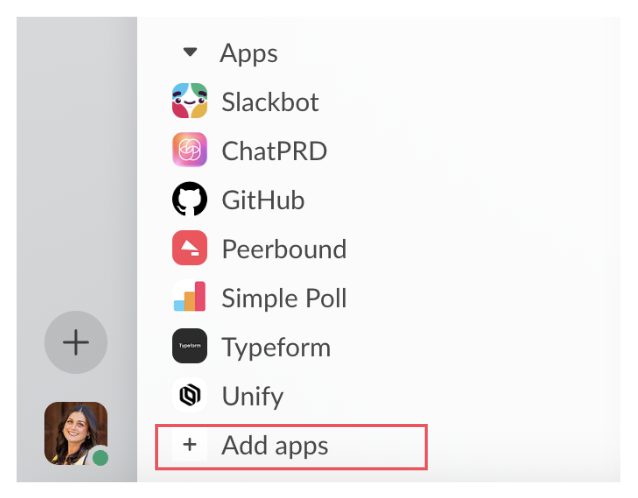
If you don’t see it, click Add apps and search for "Peerbound".
Once inside, switch to the Messages tab.
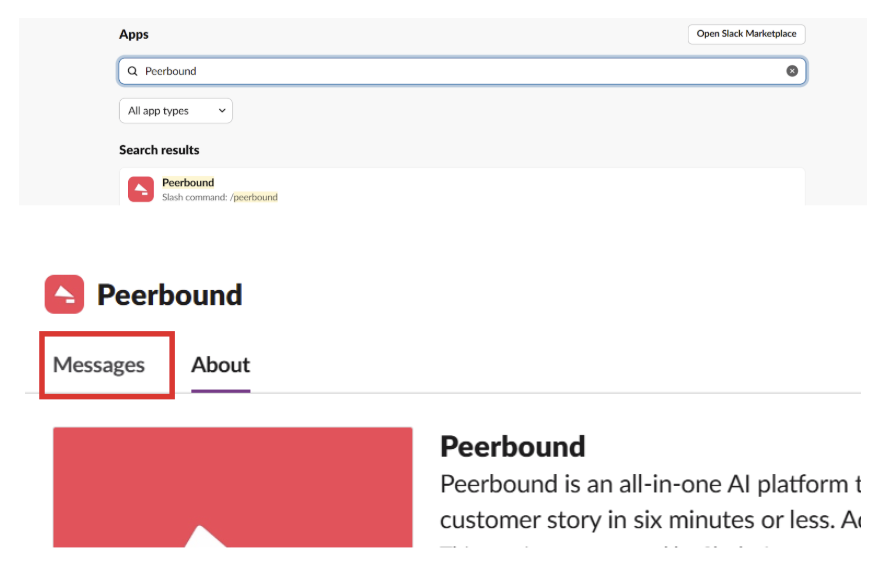
You can now ask questions directly (without typing
@Peerbound).
Support
If you run into any issues, please reach out to us at support@peerbound.com or message us in Slack.
To help us troubleshoot faster, include screenshots of any errors or unexpected behavior.