Peerbound x Gong Integration Instructions
Last updated: July 14, 2025
This guide is for Gong admins who are connecting Peerbound to their company’s Gong account.
Step-by-Step Instructions
1. Enable the Gong Integration
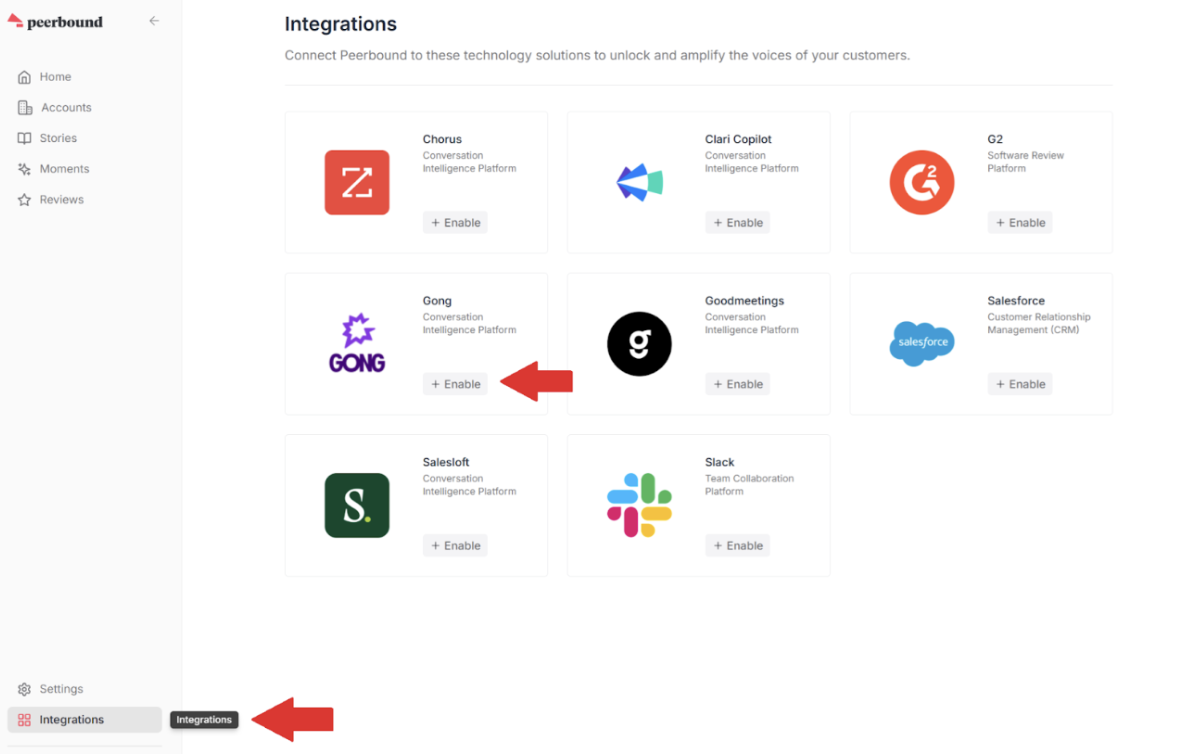
In the Peerbound app, navigate to the Integrations page and click the + Enable button next to the Gong integration.
2. Sign in to Gong
If you are not already signed in to Gong, you will be prompted to log in through the Gong authentication page.
3. Approve Integration Scopes
Once signed in, you’ll be asked to approve the requested scopes for the Peerbound-Gong integration.
Scopes requested include:
Access to call metadata
Access to call transcripts
Access to URLs for call audio and video
These permissions allow Peerbound to surface high-quality customer proof from your Gong call library.
4. Complete Integration
After granting access, you’ll be redirected back to the Peerbound app.
Click Import to start the initial sync process, then close the modal window.
5. You’re All Set
Once connected, Peerbound will begin importing your Gong data and identifying valuable customer proof. No additional setup is required.
Support
If you run into any issues, please reach out to us at support@peerbound.com or message us in Slack.
To help us troubleshoot faster, include screenshots of any errors or unexpected behavior.